- Hand coding is recommended in your web designing projects but you are free to use an editor of your choice. (Dreamweaver, Frontpage, GoLive, etc..).
- You must use CSS, JavaScript, Forms, Tables, in your web project.
- Use Internal Links, External Links, Mailto Links, Images, Animation.
- Avoid using Frames.
- Use either external or internal CSS.
- Your website must have at least 4 dynamic pages. However this limit can change depending on your guide. (e.g One feedback form).
- Try creating entire website with .ASP or .ASPX pages. If your syllabus has PHP then try creating all the pages in .PHP rather than .HTML.
- There should be javascript validation for all your form fields.
- Database can be of your choice (Ms Access o SQL). Many goes with MSAccess for .ASP at first place. But, you can go with MySQL for PHP or MSSQL if you are using ASP.Net.
- Your forms must be submitted and those records should be saved in database without any errors. Supervisors might try to find errors in some complex database related queries.
- Some supervisors expect a page in a website which will display the records entered in the database. That demonstrate reading data from database skills.
- Follow all the rules and the theory that you learn in your Applied Components – Web designing principles.
- Be prepared with your web project documentation – Supervisor might ask you the ways of uploading website, how to market a website, etc
- Some of the dynamic content that you can have in your web projects are:- Sign the Guestbook,
Read More...
Live Website Project Requirements for Bsc Computer Science
Part II – WEB Project
Requirements & Recommendations in project –
Send Automatic Direct Message to your New Twitter Followers for Free
If you are looking to send direct message to your new twitter followers automatically, then these free tools are for you. Use them wisely, do not spam or send messages continuously.
Twitter DMer
Twitter DMer is the simplest tool to send automated direct message to your new twitter followers. Its totally free to use. All you need to do is login to their account through your twitter credentials and set up a message that you would like to send to your new twitter followers. You cannot send it to your existing followers but it will be automatically send to the new followers. Visit WebsiteSocial Oomph
Social oomph is another service to send automatic direct messages to your new followers but is slightly more advanced. You have two options, free and professional accounts. You can send DM in free account. Both the account has more features than just sending DM. Visit WebsiteTweet Manager
Using tweet manager you can follow and track twitter users using your desired keywords. It provides more features than simply sending direct messages to new followers. You can look at their videos on the front page to get a detailed idea of how it works. Along with sending DM to new followers, you also get an option to send mass messages to 1000 or less number of users at once. Visit Website Read More...New Category Added – Computer Science
This category will contain all the resources and articles for Computer Science students. The posts can be guidance for Software Project or Website Project. Resources that will be provided in this category can be previous years question papers, software and website documentation, user submitted website or software projects and other university news.
There was a separate website dedicated to Computer Science students. But i sold it at a pretty price and now thinking of including the fresh new content on this website. Users can submit the projects and documentations which will be listed in Computer Science category along with the credit.
Please note, these software source codes and site files should be at beginners level and strictly for educational purpose. Read More...
How To Watch the Scariest Video on Internet Without Wetting Pants
I am writing this in Webmasters because most of the website owners or bloggers are probably frequent internet surfers and you must have came across such scariest videos on you tube and wanted to watch those out of curiosity right?
I have watched tens of so called scariest videos on youtube and i have read hundreds of comments of people saying how they almost shit their pants while watching the videos.
Now i don't know whether they did that in real or not but their comments always shows how scary the video must be. I have also seen prank videos where people record other people watching scary video and getting scared out of grim or shock.
There is no scary video on internet that can scare the shit out of me like other people claim it did for them. And even you can watch any scary video without blinking your eye, screaming or moving a bit by following these simple steps below.
What scares you the most in Video?
Emotional Disturbance or Shock
Mostly sudden appearances of ghostly images with a loud sound. That's stupid and i hate it. Even some hollywood movies has it. It doesnt make it any scary, anyone can do that to anyone and that is also the most common prank in real life. That obviously causes emotional shocks for a while and that is how it scares you. So if you are watching a video on internet, follow these steps. [caption id="attachment_1792" align="aligncenter" width="500" caption="Most common scary face from the movie Exorcist"] Read More...15 On-Page SEO Optimization Tips
Search engine optimization is the most important process and there are certain basic tips needed to be followed for obtaining better optimization results. Especially for on-page there are certain tips for good optimization.
- The domain name should match the business niche of the website. It could help if the targeted keyword is in the domain name of the website.
- The targeted keyword for the website should be present in the title tag. This is mandatory step because search engines crawls and displays titles on their results page.
- In optimization process Meta tag is always necessary. Use targeted keywords in meta section along with title and description. Some social bookmarking websites will display the description of the web page from the meta section.
- Use headers on content. This is because the header tags indicate the search engine about the related content on a web page and thus better optimization is done.
- For improving the ranking and site indexing, set a fixed article posting frequency and keep the content unique with proper keyword density and usage.
- Use keyword research tools to find trending keywords or phrases on internet. That can improve your ranking on SERP and give organic traffic.
- Focus on long tail keywords and use them consistently throughout the post. Avoid keyword stuffing but focus on having a proper keyword density.
- It is always advisable to use Latent Schematic Indexing words when the contents in the website are formatted.
- Keep clean navigation and have proper internal links on targeted keywords.
- Get backlinks
Read More...
Backup Website and Database the Safe and Smart Way
Backing up website database is the most important process every blogger must do. Shit happens and no one knows when your server might get crashed or hit by an attack that would need a total reset. However, taking a backup needs a bit more attention and focus than normally thoughts. You cannot simply open the PHPMyAdmin and Export the entire database as a dump file.
When you reach a good number of total blog posts then its important to back up the database at least weekly or daily depending on your blog posting frequency.
Following is a short checklist to follow to make sure your backed up dump file works with the fresh CMS installation.
It doesn't matter what CMS you are using. Whether Wordpress, Joomla, Drupal or a Custom PHP or ASP.Net application. Each CMS has a database that will need to be backed up just in case things go wrong.
Read More...
Making a List of Active Plugins and Mods
If you are using Wordpress, Joomla, Drupal or other such Open Source CMS, then it has hundreds of plugins and mods that you can use and you probably have few tens of plugins already installed on your blog or website. But you need to note down every active plugin that is running on your website. Many a times you install a plugin but have not activated it. The thing is, when you use a plugin, many a times it will create its own table on the database to store data that it process. When your website crashesRead More...
Get Promotional Reviews on your Website, Videos or an eBook
If you are looking to get your business videos, blog or an ebook reviewed for promotional purposes, then you can find such services that might charge you tens or hundreds of dollars.
Instead, its better to get it done by a passionate reader who will actually click through your business website or view your promotional videos to write an appealing review about it.
Nadine loves to read and learn innovative concepts, unique perspectives, creative ideas, short stories and business opportunities. She will personally read your blogs, listen to your promotional videos whether they are instructive or musical, as well as surf your website for better clarity on your products or services and write a total of four positive reviews.
Getting an appealing review about your product, online service or an informational blog can also be used as testimonials that can inspire and encourage others to join and support your efforts.
And here you are getting four positive reviews for as low as $5 for promotion.
Click here to buy reviews. Read More...
Using Image Processor to Automate PSD to JPEG Creation in Photoshop
If you create tens of banner images everyday then you can automate the PSD to JPEG creation using Image Processor in Photoshop. You will also need to do this if you are automating text change or translation on banner images in Photoshop using CSV file.
To process PSD files. Click on File -> Scripts -> Image Processor
[caption id="attachment_1733" align="aligncenter" width="564" caption="Image Processor in Photoshop"]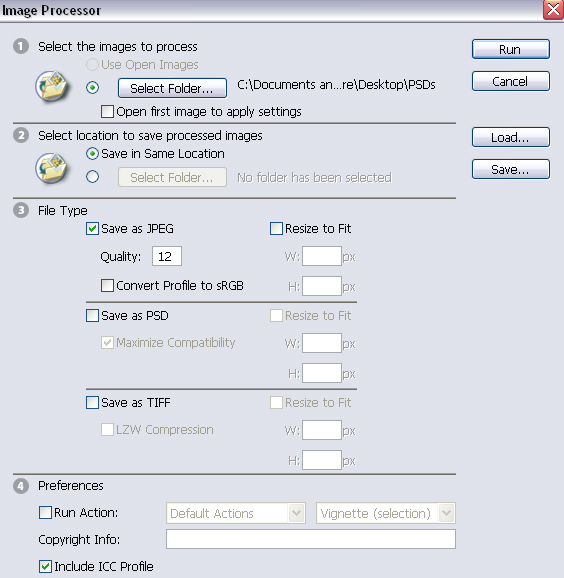 [/caption]
Step 1:
In Step 1 frame, select the folder that contains all of your PSD files.
Step 2:
In Step 2 frame, select the folder where you want to save all the JPEG files. You can select a specific location of the default location by selecting desired option.
Step 3:
In Ste 3 frame, you can select the Quality of the JPEG image, 12 is for the highest quality image.
Leave the Step 4 as it is for now, unless you want to go Advanced with extra Actions during PSD to JPEG creation.
Simply Click on button Run and Photoshop will Automatically open each PSD file one by one from the selected folder and convert them to JPEG image, save them in the selected folder and close the image.
This way you can speed up your job by focusing on PSD creation and then running the Image Processor to create JPEG files. There is no limit to how many PSD files you have in your folder. They will all be made into JPEG files. Read More...
[/caption]
Step 1:
In Step 1 frame, select the folder that contains all of your PSD files.
Step 2:
In Step 2 frame, select the folder where you want to save all the JPEG files. You can select a specific location of the default location by selecting desired option.
Step 3:
In Ste 3 frame, you can select the Quality of the JPEG image, 12 is for the highest quality image.
Leave the Step 4 as it is for now, unless you want to go Advanced with extra Actions during PSD to JPEG creation.
Simply Click on button Run and Photoshop will Automatically open each PSD file one by one from the selected folder and convert them to JPEG image, save them in the selected folder and close the image.
This way you can speed up your job by focusing on PSD creation and then running the Image Processor to create JPEG files. There is no limit to how many PSD files you have in your folder. They will all be made into JPEG files. Read More...
[/caption]
Step 1:
In Step 1 frame, select the folder that contains all of your PSD files.
Step 2:
In Step 2 frame, select the folder where you want to save all the JPEG files. You can select a specific location of the default location by selecting desired option.
Step 3:
In Ste 3 frame, you can select the Quality of the JPEG image, 12 is for the highest quality image.
Leave the Step 4 as it is for now, unless you want to go Advanced with extra Actions during PSD to JPEG creation.
Simply Click on button Run and Photoshop will Automatically open each PSD file one by one from the selected folder and convert them to JPEG image, save them in the selected folder and close the image.
This way you can speed up your job by focusing on PSD creation and then running the Image Processor to create JPEG files. There is no limit to how many PSD files you have in your folder. They will all be made into JPEG files. Read More...
Automate Text Change or Translation on Banner Images in Photoshop
If you own a large website that needs frequent text changes on banners or if you are simply trying to create a banner with multiple text variation on it, then you can use this automated process to ease your work. Also, many large websites that uses multiple languages for different geo locations can use this method to translate the text on banner images.
To explain the process, we will create a 300 x 250 banner image with Title text and a Sub title text. The focus is on the automated process and not the design, so i have created a very simple image, sorry about that. The basic image will look like this.
[caption id="attachment_1697" align="aligncenter" width="300" caption="Basic Image"]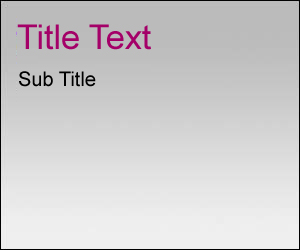 [/caption]
Please note that there are only three layers on this PSD file. The first one is the background that also contains thin black border. The other two are text, that is Title and Sub title. And it is very important to give a name to these Text Layers, you will need to use it ahead in the process. Here is the screen for the layers.
[caption id="attachment_1698" align="aligncenter" width="209" caption="Give names to each text layer on image."]
[/caption]
Please note that there are only three layers on this PSD file. The first one is the background that also contains thin black border. The other two are text, that is Title and Sub title. And it is very important to give a name to these Text Layers, you will need to use it ahead in the process. Here is the screen for the layers.
[caption id="attachment_1698" align="aligncenter" width="209" caption="Give names to each text layer on image."]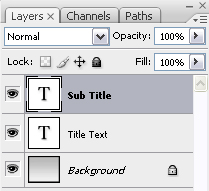 [/caption]
Now that your basic banner with text is ready, you need to create a CSV file in Excel that will contain all the different variations of the text or simply translations of the default language into
[/caption]
Now that your basic banner with text is ready, you need to create a CSV file in Excel that will contain all the different variations of the text or simply translations of the default language into
Read More...
[/caption]
Please note that there are only three layers on this PSD file. The first one is the background that also contains thin black border. The other two are text, that is Title and Sub title. And it is very important to give a name to these Text Layers, you will need to use it ahead in the process. Here is the screen for the layers.
[caption id="attachment_1698" align="aligncenter" width="209" caption="Give names to each text layer on image."][/caption]
Now that your basic banner with text is ready, you need to create a CSV file in Excel that will contain all the different variations of the text or simply translations of the default language intoRead More...
How to Keep Computer Clean and Secure
This can be a bit outdated info for some of you readers but i have seen increasing number of key phrases searches over this article on my other blog. So i thought of transferring the post on this blog with traffic redirection.
To make sure that your computer is clean and free from unwanted cookies, worms, trojans, adwares & spyware, the least and the most basic things that you can do is to perform the following two steps.
I use Quick Heal Total Security to protect my computer and here are the things i noticed while it kept defending my PC.
Read More...
- With a high speed cable internet connection, the computer is immune to almost all the virus, trojans and worms and other malicious software. You probably surf so many websites with pop up ads that you won't know when your computer might get affected by adware or spyware.
- The first place for the Trojans, whenever they affect a computer is "Temporary Internet Files\Content.IE5". Most of the Trojan Downloaders, worm and other malicious programs can be found in this folder. I got to know this from the antivirus software that i used. It showed that path whenever anything harmful was detected on my computer.
- The cookies folder can also keep harmful adwares and high priority tracking cookies that can track all your internet activities including your personal information like credit card details and passwords.
Read More...