Forums are the best place to share and discus trending topics on the internet. Forums can also be used to promote your online business if done correctly. One should of course not spam on forums because that would not only affect other users experience but will also get your account banned.
There are hundreds of forums on internet in almost all the niche you could possibly be in. Forums can also help you get quality backlinks through signature. Since this signature goes with all your replies and started threads, you end up getting hundreds of backlinks from one forum as per Google's Webmaster Central.
Be Regular
Almost all the forums have their own criteria behind letting users add a signature link on their account. Forums need active members and not spammers. So they will basically hold you for a set period of day or until you make a set number of posts before you could add a signature link.
So be regular in reading threads and posting replies. Don't go random, reading relevant topics will also improve your knowledge and the chances are that if your signature link and title is relevant to the thread you replied, then you will get a good amount of traffic from there.
Choose Relevant Category
There can be several categories in the niche you choose. Browse through the categories to find which suits your niche the most and interact with other members in that category.
Reply to posts and help others in their issues. That will increase the potential of your
Read More...
Automatic Backlinks is an amazing free online service that provides a fully automatic set and forget link exchange system for website owners and SEO professionals.
All you need to do is to sign up with them and place their code on to your website or a blog. You can also put the code on the sidebar making it site wide. The system will automatically display a set number of relevant links on your blog and at the same time your set link will be displayed on other blogs in their directory.
Earn Link Credits
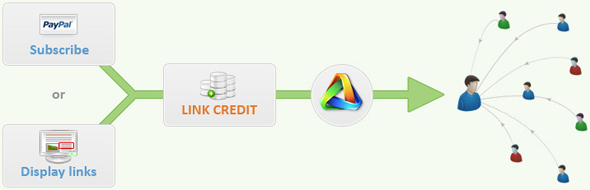
Automatic Backlinks system works on a link credit basis. The more links you display on your blog the more credit you earn and the more backlinks you will get.
[caption id="attachment_1466" align="aligncenter" width="590" caption="Automatic Backlinks Credits"]
[/caption]
If you don't want to display any links on your blog then you can simply purchase the credit. Credits are really cheap at a price of $1 per credit.
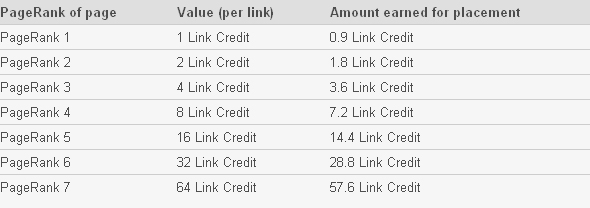
Links Credit Worth
[caption id="attachment_1471" align="aligncenter" width="590" caption="Automatic Backlinks Credits Worth"]
[/caption]
When you display links on your pages,
Automatic Backlinks will deduct 10% of the above value before crediting your account. This is to ensure that they have a small reserve of Link Credit in the system to be able to sell to those who choose not to display links on their pages.
Control Your Links
The
Read More...
What is Privacy Policy?
A
privacy policy for the website is a set of statement that discloses all the possible ways the website collects user data. The contents of privacy policy will depend upon the applicable law and may need to address the requirements of multiple countries or jurisdictions.
Some services like online store takes a lot of personal information from the user that includes sensitive data like credit card number, name, address, phone number, etc. Hence, it is needed to guarantee them that their data will be safe with the site owners and that it will not be misused or sold to third party.
Why should your Website have a Privacy Policy?
Privacy policy basically declares the type of data that is collected from the users and that it will be solely used for the communication or business with the website owners or the company respectively.
This can also guarantee the users that their data will not be misused.
Many online services, social communities and other online business has a privacy policy because they collect user details. But you might be wondering what information can a blog collect when its just an informational blog.
The need for having a privacy policy on a blog also comes when most of the Advertising networks these days including Google Adsense has made it mandatory for the website to have a privacy policy.
Possible ways a Blog can collect user information
Blog Comments: Almost all the blogging CMS have a commenting feature for the blog posts. The most important details taken during
Read More...
Titles are the most important part of your blog posts. This post is based on the earlier post:
Writing SEO content to increase organic traffic. Many search engines consider titles of the post to display results on their results page.
Therefore, writing search engine optimized titles can help your website get organic traffic. When a blog is new it has low readership due to its less reach. Hence at first, what you write does matter. Doing a good keyword research through Google insights can help you find the trending keywords on internet.
Some of the other tools to use are:-
Once you find the keyword that you want to get organic traffic on, simply make use of it in framing the titles for your blog posts. Use long tail keywords in the title and use it consistently throughout the rest of the post.
I have been trying this and i have seen a significant improvement in organic traffic.
Avoid keyword stuffing. you wouldn't want to use keyword repeatedly just for the sake of gaining organic traffic and better rankings. This common method has become quite old and is no longer safe to use.
Use SEO Slugs Wordpress Plugin
SEO Slugs is a wordpress plugin that will frame an optimized permalink for the post. It removes common words like 'a', 'the', 'in' from post slugs to improve search engine optimization.
Download SEO Slugs
It is necessary to use the most out of titles which are given a lot of focus
Read More...
Web Page loading speed is the amount of time taken for the web page to completely load itself. This can be an important factor in deciding the bounce rate of your web site. Many visitors searching for information will leave the website if they find it partially loaded or if the page is taking a lot of time to load. Below are the reasons and simple measures to take to improve the load speed.
Flash Animations and Images
Flash animations and images can take a lot of time to load if their sizes are high. Using less flash animations and images can significantly improve the loading time. If the website has a lot of images,
optimizing the images for lower bandwidth can decrease their sizes which can again improve the load speed.
External Java Scripts
Some java scripts on a web page might cause the page to load slower or display partial content. Make sure that the javascript is error free and is compatible with the leading web browsers. Other codes like the codes from advertising network can cause the web page to load slow. Many advertising network provides clean and faster loading scripts, but some codes might affect the load speed.
Use Cache and Cookies
If you have a dynamic website then use cookies to store information about the visitors. Avoid storing sensitive data in cookies. If you are using Wordpres then use Wordpress Super Cache plugin that can significantly improve the website performance. Many CMS like drupal and joomla have plugins to improve caching
Read More...
Many bloggers buy or sell an established website in order to improve their income. Here is a simple guide to follow before making a purchase to make sure you get better returns on investment.
Many buyers would not go so strict on evaluating the website before buying because it all depends on the way they are going to promote it and the how much potential they see in it.
If you have a solid strategy to promote the website or have your own ideas of using the website content then its better only to focus on the basic 5 aspects of the website.
Website Content
Check if the website is not using any article spinners or auto blogging software for content. While these methods of content generation might be beneficial for some owners, unless you have better ways of working it out, avoid going with it. The site should have enough original content at first place.
Indexed Pages
If there is enough original content then the chances are that the pages are well indexed by the search engines. Check the number of indexed pages on top search engines like Google, Yahoo and Bing. Google will most probably have more indexed pages as compared to Yahoo and followed by Bing but that depends on how good the website is.
Organic Traffic
If more pages are indexed then the chances are the website is getting more organic traffic. Organic traffic is the best type of traffic because the visitors here are highly targeted.
Organic traffic is simply the traffic that your
Read More...
My Simple Tubes is a video widget for wordpress that will allow you to post multiple videos from youtube and rotate them alternately on sidebar.
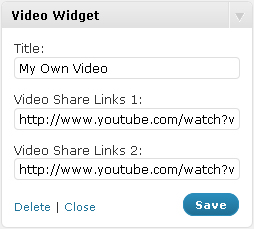
In order to embed your youtube videos on the sidebar of your blog, all you need to do is to copy two share links under your own videos on your youtube channel and paste them into the 'Video Share Links' widget's input boxes.
This widget also comes with a tweet button which allows your readers to tweet your youtube video on twitter.
The widget version is 1.0 being its official release lately and is compatible up to Wordpress 3.0.1 version.
[caption id="attachment_1385" align="aligncenter" width="254" caption="My Simple Tubes Settings"]
[/caption]
Once you install the widget the widget will show up on your widgets page. Then you need to simply drag and drop the widget on to your sidebar and the video will show on there.
[caption id="attachment_1386" align="aligncenter" width="292" caption="My Simple Tubes Live on Sidebar"]

[/caption]
Download My Simple Tubes 1.0 Read More...
WM Media was formed in 2007 that purchase established and complete websites and also provides advertising options to help grow your online business.
They will purchase a website that has a solid informational content and a stable income. Then be it a 20 pages website or a million pages website, all you need is an income proof.
The price of your website will be evaluated depending on the content, website traffic and the income it generates. Here are the detailed requirements to sell your website to them.
- Should contain at least 20 pages of unique, well written content of at least 500 words each.
- The domain is at least 9 months old.
- No porn, warez, or other questionable activities.
- Not interested in websites focused on celebrities, legal advice, medical advice, technology, or video games.
- Website should not require a large amount of maintenance (i.e. drop shipping).
- Should have back links from related websites.
- Forum sites should have a main front site as most of its traffic.
You need to provide them as much details as you can for better evaluation. It can get even better when reports from Google Analytic are provided with other statistics. You will need to add their account on your Google Analytic account. This will let them look at the statistics from GA before making an offer.
Income proof may be in screen shot but it should be genuine.
Visit WM Media Corp Read More...
Today i realized that this website was giving a nasty
Wordpress Database Query and
Cannot Modify Header errors after posting a comment and i am wondering since how long these errors have been there.
All the files involved in the error were wp-comment-post.php, wp-db.php and pluggable.php.
After an intense tiresome search on internet i came across so many different kinds of errors related to wordpress comment and database and each issue had its own fixes. But i tried to follow one of the methods that was followed to fix each kind of issue and that was to check if any comment altering plugin was causing the problem or not.
There were two comment related plugins that i was using on this website. One was Brian's Threaded Comment and the other one is Comment Luv.
Comment Luv simply fetches the latest post from commentators URL and displays it along with their comment.
Brian's Threaded Comment highly alters the comment section, it lets commentators reply to earlier comments making it easier for readers to check replies to respective comment.
I simply deactivated each comment while checking if posting comments were giving errors or not and found out that Brian's Threaded Comment was giving an error on this website.
So many bloggers are using Brian's Threaded Comment and i don't understand why it was not working on this website. Compatibility issue seems very unlikely but it is very much likely to be an error related to the theme. But again theme developers are clueless about the error and this is
Read More...
I had worked in a KPO for almost 2 years in the past where they had a huge client that sells product on internet. I cannot mention the names obviously but can surely share my experience there.
The entire process was to create ads and track their performance through the company's customized analytic suite. This involved creating both text ads for PPC campaigns and banner ads for PPC and affiliates.
One of the points was to make their real offers clear in their advertisements in order to improve conversion rates. Often many advertisers focus on attracting visitors through their advertising campaigns by writing appealing ads which can highly decrease the conversion rate.
The focus was to let advertisers know the real price and any special offers right in their ads. So if a visitor notices the ad, then he gets to read the real price and offer before visiting the website. It is likely that the visitor would go for purchasing the product directly from the landing page.
If there are multiple products with uneven prices. Then it is better to write the category of the product and the '
Starting From' price on both textual and banner ads. That can give an idea to the visitor about the starting price range of the product.
On banner ads, you can even display discount offers or other special offers in a splash image. Try dividing the contents on the banners as
- Title
- Subtitle 1
- Subtitle 2 (If required)
- Splash Icon (If any special offers)
- Offer Validity Date (If any special offers)
- CTA (Call
Read More...